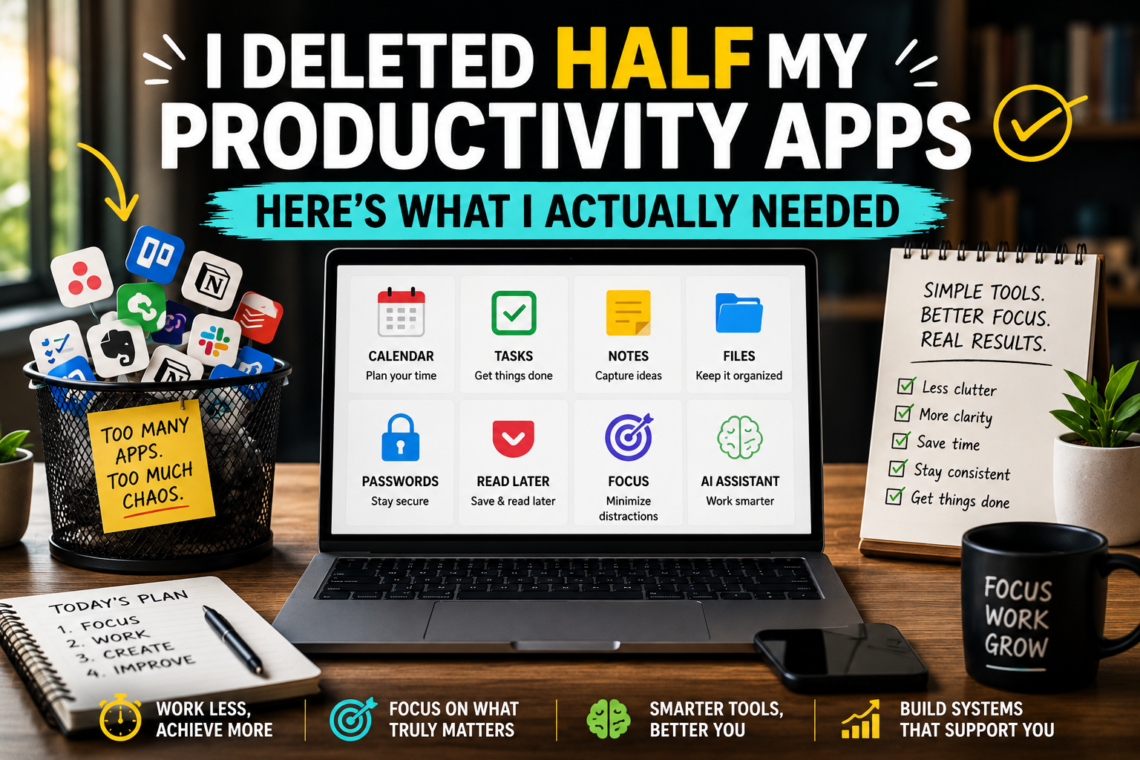
There was a point when my productivity system needed its own productivity system.
I had an app for tasks.
Another for notes.
Another for habits.
Another for saving articles.
Another for organizing projects.
A calendar, obviously.
A focus timer.
A bookmarking tool.
Cloud storage.
An AI assistant.
And somewhere in this magnificent digital command center was a document containing a list of all the tools I was supposed to be using.
Very efficient.
Except it wasn’t.
I was spending an embarrassing amount of time organizing the things that were supposed to help me organize my time.
So I tried something different.
Instead of asking:
« What productivity tool should I add? »
I asked:
« What jobs do I actually need my tools to perform? »
That question changed everything.
And if your phone, browser, and computer are slowly turning into a museum of abandoned productivity apps, this article is for you.
The Productivity Tool Trap
Productivity software is incredibly appealing because downloading something feels like progress.
You discover a beautiful task manager.
The screenshots are gorgeous.
There are colorful labels.
Automations.
Dashboards.
Charts.
Suddenly you can visualize the organized person you’re about to become.
You install it.
For three days, everything is perfect.
Then reality arrives.
A task gets written on paper.
Another goes into your email.
You put something in your calendar.
A note ends up in your phone.
Someone sends you something important through messaging.
Two weeks later, your supposedly perfect system has information scattered across six places.
So naturally, you search for another productivity app.
And the cycle begins again.
The problem isn’t necessarily the tools.
It’s that we often choose tools before identifying the problem they’re supposed to solve.
A Better Rule: One Job, One Home
This became the foundation of my simpler system:
Every important type of information should have one obvious home.
If I need to know what I have to do, there should be one place to look.
If I need to know where I need to be, one place.
If I need to find a note, one place.
If I need a file, one place.
That doesn’t mean you literally need four applications.
One tool can perform several jobs.
The important thing is eliminating ambiguity.
Because every time you wonder:
« Where did I save that? »
your system has failed a little.
Tool #1: A Calendar
Let’s start with the least exciting tool on the list.
Your calendar.
It doesn’t need artificial intelligence.
It doesn’t need motivational quotes.
It doesn’t need to congratulate you for scheduling a dentist appointment.
It needs to answer one question:
When does something need to happen?
That’s it.
Meetings belong there.
Appointments belong there.
Deadlines may belong there.
Time-sensitive commitments belong there.
But here’s where people often go wrong.
They turn their calendar into a giant wish list.
« Read book. »
« Exercise. »
« Learn Spanish. »
« Organize photos. »
« Become successful. »
Suddenly Tuesday looks like a military operation.
A calendar works best when you respect what it represents: time.
If something genuinely requires a specific time, schedule it.
If it merely needs to be done eventually, it probably belongs somewhere else.
Tool #2: A Task Manager
Your calendar tells you when.
Your task manager tells you what.
And this is where things can become unnecessarily complicated.
A useful task manager does not need 47 features.
It needs to make capturing and retrieving tasks effortless.
The most important feature isn’t beautiful design.
It’s trust.
You should be able to put something into your task system and feel confident that you’ll see it again when necessary.
The Two-Minute Capture Rule
Whenever something actionable appears, capture it quickly.
Don’t organize it perfectly.
Don’t select seven tags.
Don’t spend three minutes choosing between « Work, » « Professional, » and « Career. »
Just get it out of your head.
Organization can happen later.
Capture needs to be frictionless.
Tool #3: A Notes System
Tasks and notes are not the same thing.
« Call Sarah tomorrow » is a task.
« Ideas discussed during meeting with Sarah » is a note.
Mixing the two creates chaos.
Your notes system should become the place where useful information lives after your brain no longer needs to hold it.
That could include:
Meeting notes
Ideas
Research
Recipes
Travel information
Project references
Things you learned
Useful instructions
Writing drafts
But here’s an important lesson:
You don’t need to organize every note perfectly.
Search has become incredibly good.
A slightly messy notes system you actually use is often better than a perfectly organized one you constantly maintain.
Tool #4: Cloud Storage
There is a special type of panic reserved for knowing a file exists but having absolutely no idea where it is.
Downloads?
Desktop?
Documents?
Email attachment?
Google Drive?
USB drive?
That mysterious folder called « NEW FINAL IMPORTANT »?
We’ve all been there.
A good file system doesn’t need to be sophisticated.
It needs to be predictable.
Try organizing files around broad areas rather than creating endless nested folders.
For example:
Work
Personal
Finance
Projects
Photos
Archive
Then create subfolders only when necessary.
And please stop naming documents:
final.pdf
final2.pdf
final_REAL.pdf
final_REAL_NEW.pdf
Future you deserves better.
Tool #5: A Password Manager
This one isn’t traditionally considered a productivity tool.
I think it should be.
How much time have people collectively wasted clicking Forgot password?
More importantly, password reuse creates unnecessary security risk.
A password manager solves two problems at once:
It reduces the number of passwords you need to remember.
And it makes using unique, strong passwords much more practical.
That’s productivity.
A good tool doesn’t merely help you work faster.
It removes recurring problems from your life.
Tool #6: A Read-Later System
This one needs discipline.
Throughout the day, we encounter things we want to read.
Articles.
Reports.
Newsletters.
Research.
Interesting websites.
The temptation is to read everything immediately.
That’s terrible for concentration.
A read-later system creates a simple agreement with yourself:
« This looks useful, but I don’t need to consume it now. »
Save it.
Return to your work.
Read it later.
But there’s a catch.
Your read-later list must not become a digital cemetery containing 4,700 articles you will definitely read « someday. »
Delete aggressively.
If something has been sitting there for six months and you haven’t opened it, perhaps you didn’t need it after all.
Your bookmarks will forgive you.
Tool #7: A Focus Tool — Maybe
Here’s something unusual for a Best Tools article:
You might not need a focus app.
A timer can be useful.
Website blockers can be useful.
Focus music can be useful.
But before installing anything, try the world’s most advanced productivity technology:
Put your phone somewhere else.
Seriously.
Not face down.
Not on silent next to your keyboard.
Somewhere else.
Another room if possible.
We sometimes install complicated software to solve problems that can be solved by moving an object three meters away.
If you still struggle, then a focus tool may help.
Technology should be the second solution, not automatically the first.
Tool #8: AI — But Give It a Job
AI tools have become incredibly capable.
That also makes them easy to misuse.
Opening an AI assistant without knowing what you want is like hiring an extremely fast employee and saying:
« Do something productive. »
Give AI specific jobs.
For example:
Summarize a long document you need to understand.
Brainstorm alternative approaches to a problem.
Turn rough notes into a structured outline.
Explain a difficult concept at your level.
Help identify gaps in an argument.
Create practice questions from material you’re studying.
Compare options according to criteria you provide.
The key isn’t using AI constantly.
It’s recognizing situations where AI meaningfully reduces friction.
The Tool I Removed: The Habit Tracker
This surprised me.
I like habit trackers.
There’s something satisfying about seeing a beautiful chain of completed days.
But I realized something.
For habits that were already part of my life, tracking them added administrative work without much benefit.
I didn’t need to record that I had done something.
I needed to do it.
So I kept tracking only habits I was actively trying to establish.
Once something became stable, I stopped tracking it.
Your productivity system should be allowed to become smaller as you improve.
The Tool I Removed: The Complicated Project Dashboard
This one hurt.
It looked beautiful.
There were columns.
Progress bars.
Statuses.
Priorities.
Labels.
Deadlines.
Subtasks.
Dependencies.
Everything except someone actually doing the work.
The problem was simple.
Maintaining the dashboard required more effort than the projects justified.
For complex collaborative projects, sophisticated project management tools can be invaluable.
For personal projects?
Sometimes a document containing:
Goal
Next step
Deadline
is enough.
Complexity should be earned.
The Tool I Almost Removed: Paper
Yes.
Paper.
The ancient technology.
No synchronization.
No cloud backup.
Terrible search function.
Absolutely no AI integration.
And yet surprisingly useful.
I discovered that paper works extremely well for temporary thinking.
Sketching an idea.
Planning a complicated day.
Working through a problem.
Writing three priorities.
Making a quick diagram.
Not everything needs to become permanent digital information.
Sometimes paper is useful precisely because it disappears.
The Weekly Tool Audit
Here’s an exercise worth trying.
Once every few months, look at the tools you use and ask five questions.
1. What problem does this tool solve?
If you can’t answer clearly, that’s interesting.
2. How often do I actually use it?
Not how often you intend to use it.
Actually use it.
3. Does another tool already do this?
Duplication creates friction.
4. What happens if I stop using it?
If the answer is « probably nothing, » you have your answer.
5. Does this tool save more time than it requires?
This is the big one.
A productivity tool that requires constant maintenance can become a productivity problem.
Build Your Minimum Viable Productivity System
If I had to rebuild everything from zero tomorrow, I would start with only:
Calendar — where I need to be.
Tasks — what I need to do.
Notes — what I need to remember.
Files — what I need to keep.
Password manager — what I don’t want to remember.
That’s the foundation.
Everything else has to justify its existence.
AI?
Add it if it genuinely improves specific workflows.
Focus app?
Add it if distraction remains a problem.
Read-later app?
Add it if you regularly encounter material worth saving.
Project manager?
Add it when your projects become complicated enough to require one.
Start small.
Add complexity only when reality demands it.
The Best Productivity Tool Is the One You Forget About
This sounds strange, but I think it’s true.
Great tools eventually become invisible.
You don’t spend your day admiring your calendar.
You use it and move on.
You don’t constantly reorganize your task manager.
You check what needs doing and do it.
You don’t redesign your note-taking system every Saturday night.
You find your note.
That’s what good technology should feel like.
Quiet.
Reliable.
Available when needed.
Then gone.
Final Thoughts
The productivity industry often encourages us to believe that we’re one application away from finally becoming organized.
Usually, we’re not.
The missing ingredient is rarely another tool.
It’s clarity.
What needs to happen?
When?
Where does the information belong?
What deserves your attention right now?
The simpler my system became, the easier those questions became to answer.
So before downloading your next productivity app, try something else.
Open the tools you already have.
Delete the ones you don’t use.
Simplify the ones you do.
Then spend the time you saved doing the thing all those tools were supposed to help you do in the first place.
The work.